 IKARUSpersonal ai os
A week with IKARUS
Study to keep up with.
An idea to keep building.
I'm Radu, a student building IKARUS. I started at the beginning of June. This walkthrough takes that mix of study and building and turns it into a small week you can follow yourself.
An illustrative scenario inspired by my work, not a diary of a particular week. Screens use synthetic example data; names and goals may differ. The public Mac release is being prepared. Join the Mac waitlist for access.
A study outline is due Friday. A small improvement to IKARUS also needs attention.
Finish the outline and make room to build, without planning every hour away.
Start small.
Two projects. One week.
Imagine opening your Mac with a study deadline on your mind and an idea for the app you want to get back to. The first job is to put each piece of work somewhere you can find it again.
Try it in your own workspace
When your invitation arrives, install IKARUS and follow first-run setup. Start on Free: tasks, goals, habits, notes and three Nexus workspaces, with no AI. You can follow the week without configuring a model.
Choose a real deadline and one side project. In this example, they are a study outline due Friday and an improvement to IKARUS.
Give each project a place.
Keep the outline and the app in their own workspaces.
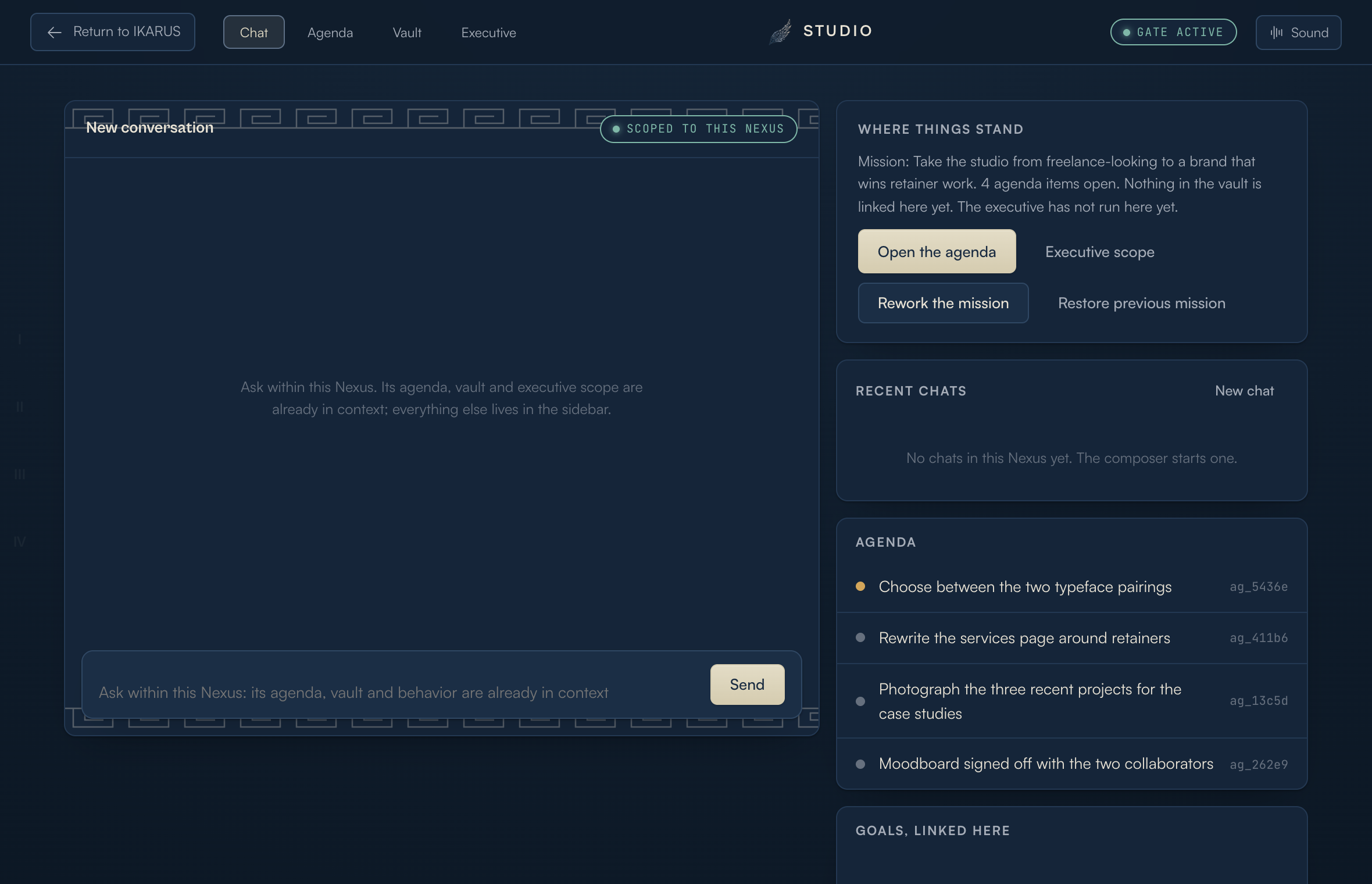
Create a Nexus called Study. Give it the mission “Keep my study projects and deadlines in order.” Add “Read the project brief” to its agenda, save the brief in the Vault and link the relevant material.
Create a second Nexus called Build for the app. Add one concrete item: “Review the website tutorial.” When a new idea for IKARUS comes up during study time, there is somewhere to put it and return to later.
Two clear workspaces. Today's study task no longer depends on remembering where you left the brief.
Screenshot unavailable. You can continue with the text below.
Make Friday specific.
“Work on my studies” is too open-ended.
Open Goals and add “Complete my project outline by Friday.” Choose its life area and target date, save it and link it to Study.
Add three milestones: choose the question, collect three useful sources, and write the outline. Keep these manual on Free. Now you can finish a piece of the project in one sitting.
Optional: ask AI for a first draft of the roadmap
On a paid plan with a compatible model, generate a roadmap, edit the suggested steps and use its create button to save it. A suggestion does not know your course requirements better than you do; check it against the brief.
The deadline has a finish line, and the first milestone tells you where to begin.
Start with the time you have.
The day has other commitments, too.
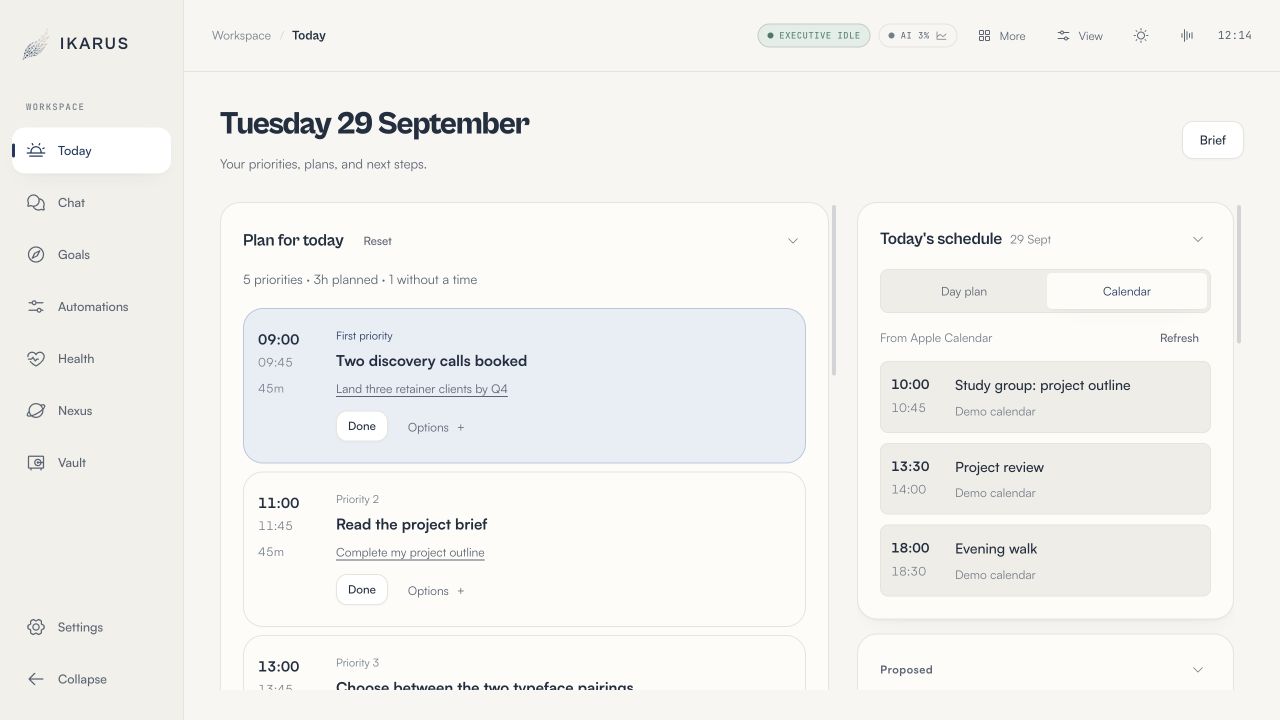
Open Today. Daily Direction draws on your goals and agenda; read the reason beneath a priority before choosing it. For this week, the first useful step is choosing the study question.
Use Options to pin a priority or dismiss it for the day. Mark it Done when you finish the linked item. Leave the Build task for a later work session if the study deadline needs the time.
Screenshot unavailable. You can continue with the text below.
Check the actual calendar
In Today's schedule, choose Calendar to see Apple Calendar events after granting access on your Mac. Use Refresh after changing an event. Day plan shows the planned blocks separately.
AI day planning is optional and needs a paid plan. Add fixed commitments in Settings and review proposed times: Calendar events are not automatically treated as blocked slots. Writing the plan to the IKARUS calendar is a separate action.
Screenshot unavailable. You can continue with the text below.
A full list is not the whole day.
Keep one small habit alongside the work.
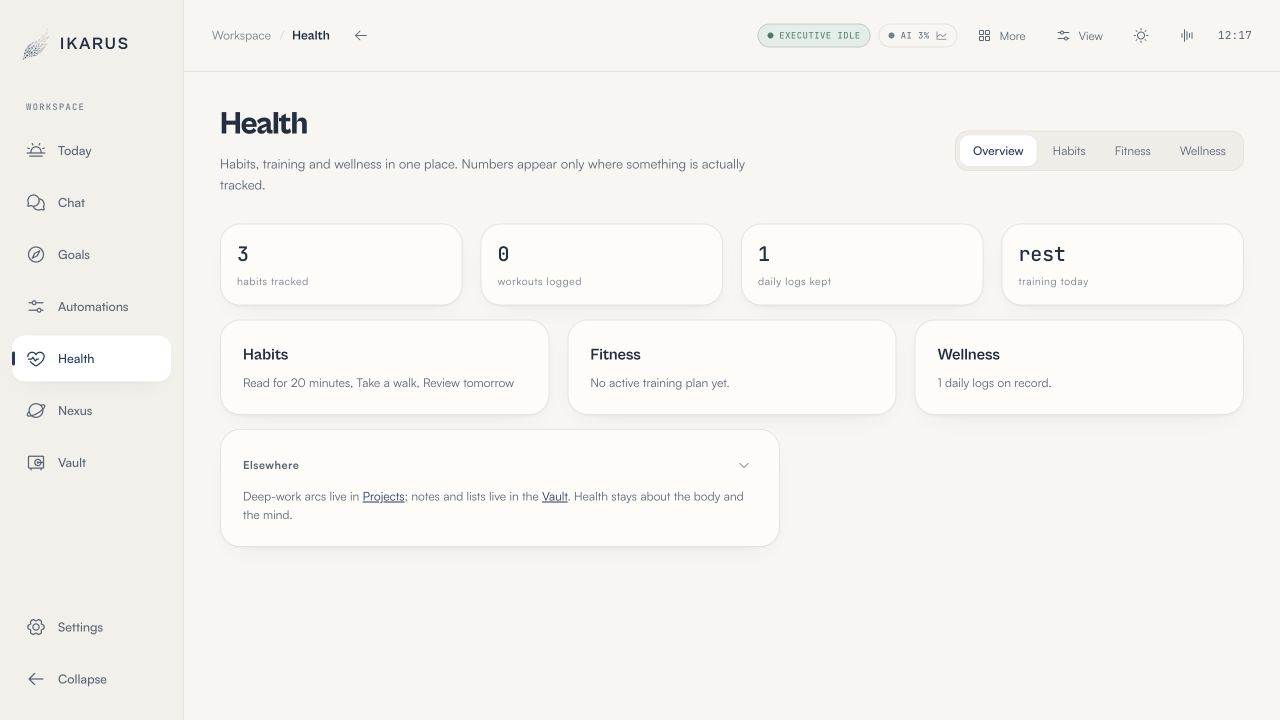
Open Health, then Habits. Enter “Read for 20 minutes” in Add a habit and choose Add. Check it off after spending that time with your sources. The history comes from your own check-offs.
In Wellness, record Low, Steady or High energy, or skip it. Fitness shows your recorded training and a weekly plan when available. Use that check-in to make your own judgement about what fits today.
Health entries are stored locally. Asking cloud AI to use them may send relevant information to the provider. See how your data is handled.
Screenshot unavailable. You can continue with the text below.
Ask with something to work from.
Get help where you're stuck.
By now, Study has a brief, a goal and a few next steps. If choosing between two questions is holding you up, you have useful material to bring to a conversation.
On a paid plan, choose your connection in Settings, then Subscription. Local supports AI on your Mac or your own API key; Pro and Max also include cloud AI. Understand the model choices.
Return to Study. Its Executive holds the assistant's instructions and tool settings. Add “Keep advice brief and focus on Friday's deadline.” Review tool access and Trust Center permissions before asking it to act.
“Help me compare these two questions against my project brief. What would make each manageable by Friday?”
Include the brief and both questions. The assistant receives selected context, so do not assume it sees every saved file. Review its answer and save the decision you want to keep.
Open the Morning Brief to get your bearings, then return to Today. Mail and calendar coverage depends on connected services; AI summaries depend on your plan and connection.
Finish, then decide what to repeat.
The outline is ready. The next session has a starting point.
Finish the final milestone and save the outline with the project material. When you return to Build, the website task is still there. You can pick it up without reconstructing the idea from memory.
After a routine has proved useful over several sessions, consider saving it in Automations. A short review of open project items could be a candidate. Create a workflow, review a suggestion or begin from a recording of the assistant's actions.
Check what every step reads, changes and connects to before saving. Run it and inspect the result. Automations need a paid plan and a compatible model, and still follow current permissions.
Start with one deadline, one workspace and one action you can finish today. Add the second project and the assistant when they help.
The public Mac release is being prepared. Free includes three Nexus workspaces, tasks, goals, habits and notes, with no AI. AI chat, advanced planning, browser assistance and automations need a paid plan and a compatible model. Compare plans or join the waitlist.